 Hardware is nothing without the right code running on it. If you missed Part 1 — Inside the Adamantium Pro, it walks through our flagship workstation build—i9 14900KS horsepower, RTX 4090 graphics, ultra‑quiet cooling, and terabytes of NVMe—explaining how we balance top‑end performance with everyday practicality. This follow‑up shifts focus to the software layer—the apps, tweaks, and automations that let me move at founder‑speed while staying secure, organized, and future‑focused.
1 · The Open‑Web Stalwart — Firefox
I start every client engagement in Mozilla Firefox. Speed benchmarks come and go, but Firefox’s independence from the Chromium monoculture matters: it keeps the web’s plumbing diverse, open‑source, and standards‑driven. Extensions like Multi‑Account Containers and uBlock Origin give me clean pen‑testing sandboxes and an ad‑free baseline, while the new Total Cookie Protection feature locks third‑party trackers out of my sessions.
2 · Sculpting the Desktop — Stardock Object Desktop
Component
What it Does
Why I Use It
Start 11 v2
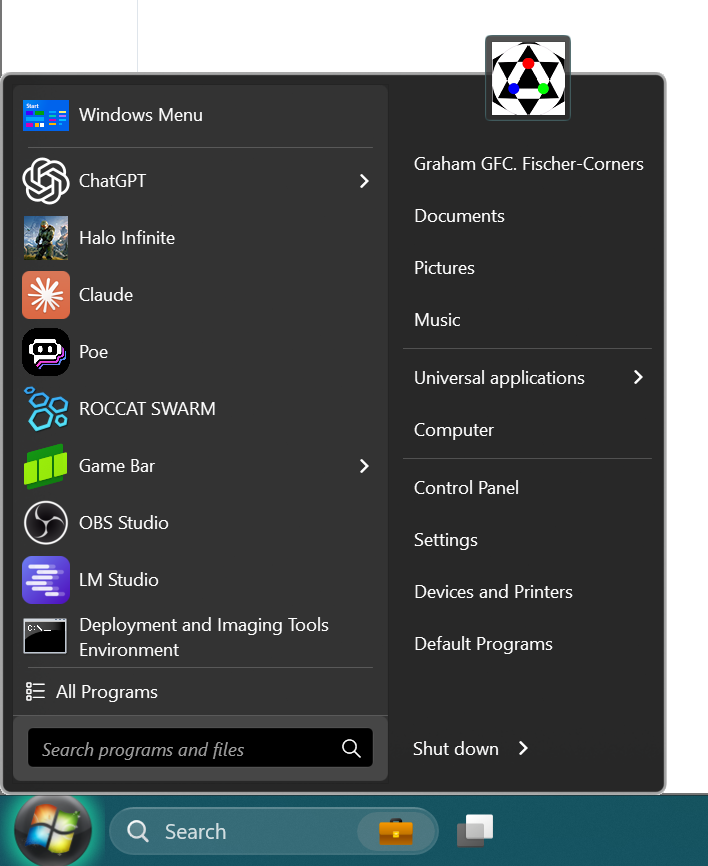 Re‑skins the Start menu & taskbar
Muscle memory matters; I can flip between Windows 11 and classic layouts in seconds.
Fences 6
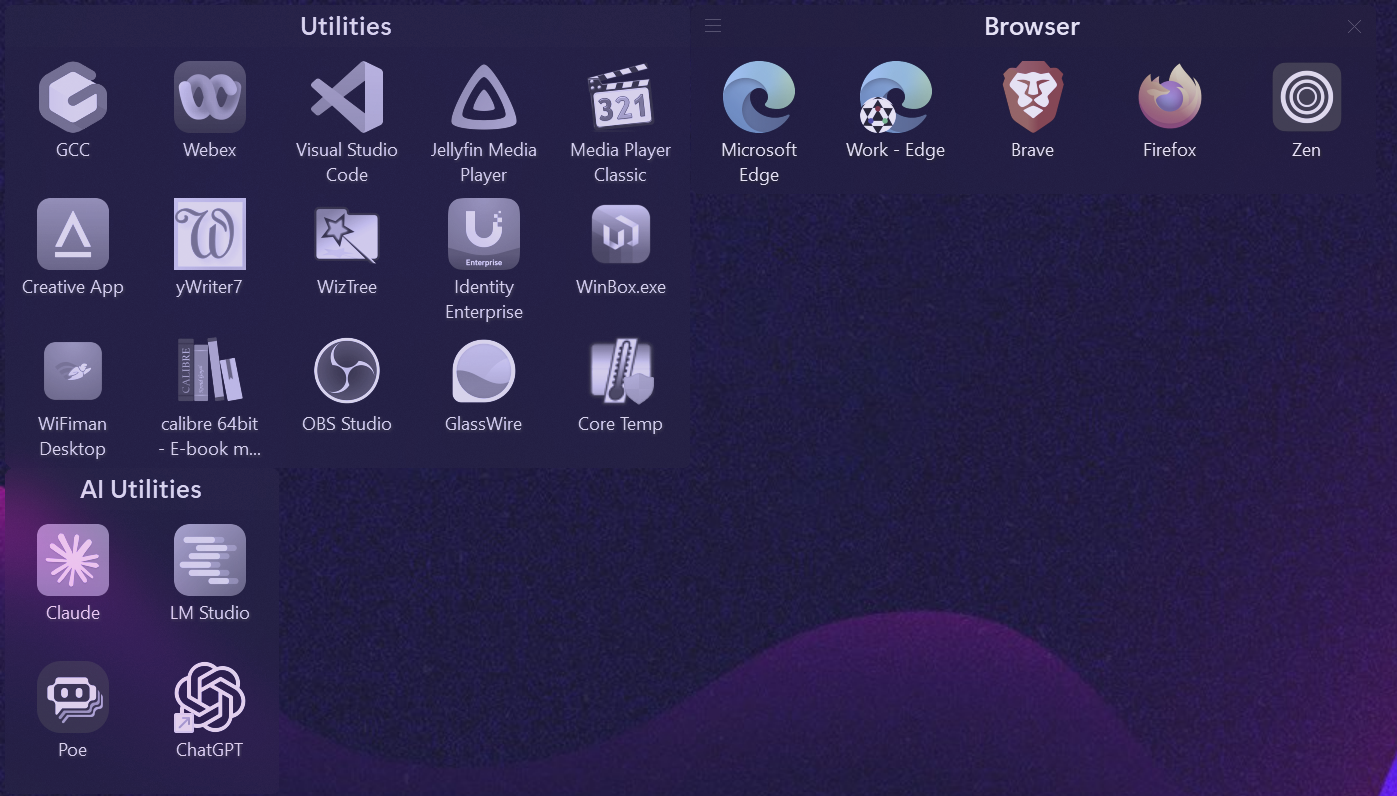 Auto‑sorts desktop clutter into snap‑to grids
Keeps client screenshots, spec sheets, and in‑flight notes visually separated and instantly searchable.
Multiplicity
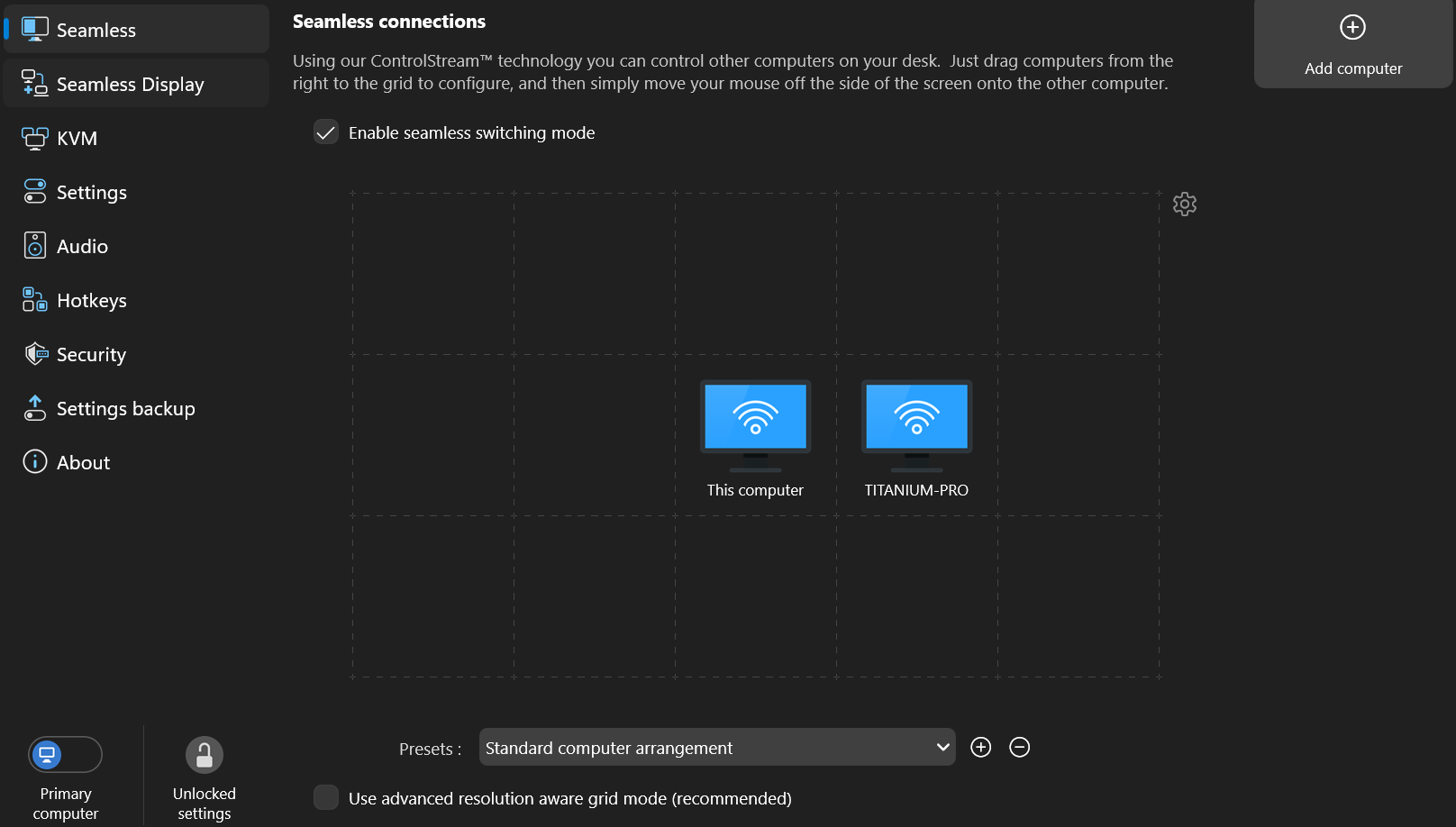 Software KVM + seamless cursor carry‑over
Turns the MSI Titan into either a second monitor or an independent PC—same keyboard & mouse, zero lag.
Small quality‑of‑life tweaks compound over thousands of context‑switches a week; Object Desktop is the glue that keeps my workspace friction‑free.
3 · Where Business Happens — Microsoft 365
Most SMBs and enterprises live in 365, so I do too. Outlook rules email triage; Teams handles real‑time chatter and impromptu screen‑shares; Word, Excel, and PowerPoint cover deliverables. Living in the same ecosystem as my clients means fewer compatibility surprises and faster hand‑offs.
4 · Locking It Down — KeepassXC + YubiKey (Solo) / Vaultwarden (Team)
Security starts with “something you know and something you have.” My local vault lives in KeepassXC, protected by a YubiKey‑generated OTP. For multi‑user environments we roll out Vaultwarden—a lightweight, self‑hosted Bitwarden fork that scales from two seats to two hundred without SaaS lock‑in.
5 · Apps‑on‑the‑Go — PortableApps + Cloud Sync
A cloud‑synced PortableApps folder means utilities like FileZilla, PuTTY, and WinMerge are always up to date and launchable on any fresh Windows install—no admin rights required. You can also keep a fully offline copy on a USB stick or portable SSD, so your toolbox works even when the uplink doesn’t. Perfect for onsite triage when you don’t have permission (or bandwidth) to install software.
6 · System at a Glance — Rainmeter
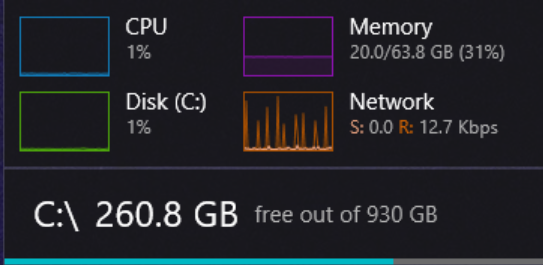 Rainmeter is my live dashboard. The core engine is feather‑light, but its skin + plugin ecosystem turns Windows into a personal NOC wall:
Skin / Plugin
What it Shows
Why I Like It
Win10 Widgets
CPU, GPU, RAM, disk I/O, network throughput
Zero‑friction install; matches native Win‑acrylic styling.
Illustro (default)
Minimal text gauges
Perfect for remote‑desktop sessions on low bandwidth.
Enigma
Sidebar with weather, Gmail, RSS
Lets me skim headlines and inbox count without opening a browser.
Mond
Spotify controls + album art
Keeps music hotkeys off my keyboard and out of Teams.
HWiNFO plugin
Per‑core temps, fan RPM, VRAM junction
Deep‑dive metrics when I’m overclocking or thermal‑testing new hardware.
Power‑User Tweaks I Depend On
Conditional color shifts – widgets fade from green → amber → red as temps or latency cross safe thresholds.
Click‑through action buttons – one‑tap scripts to flush DNS, restart Explorer, toggle HDR, or launch OBS.
Git‑versioned INIs – every config lives in a private repo; cloning onto a fresh laptop restores my entire dashboard in <30 seconds.
Multi‑monitor awareness – undocking the MSI Titan collapses the sidebar; plugging into a three‑screen rig re‑flows the layout automatically.
OpenHardwareMonitor → JSON bridge – Rainmeter feeds metrics into Home Assistant for whole‑office wallboards.
The upshot is a mission‑control view of temps, network jitter, and battery drain—issues surface here before they become client‑facing support tickets.
7 · Speed‑of‑Light Input — Programmable Mouse + Ditto Clipboard Manager
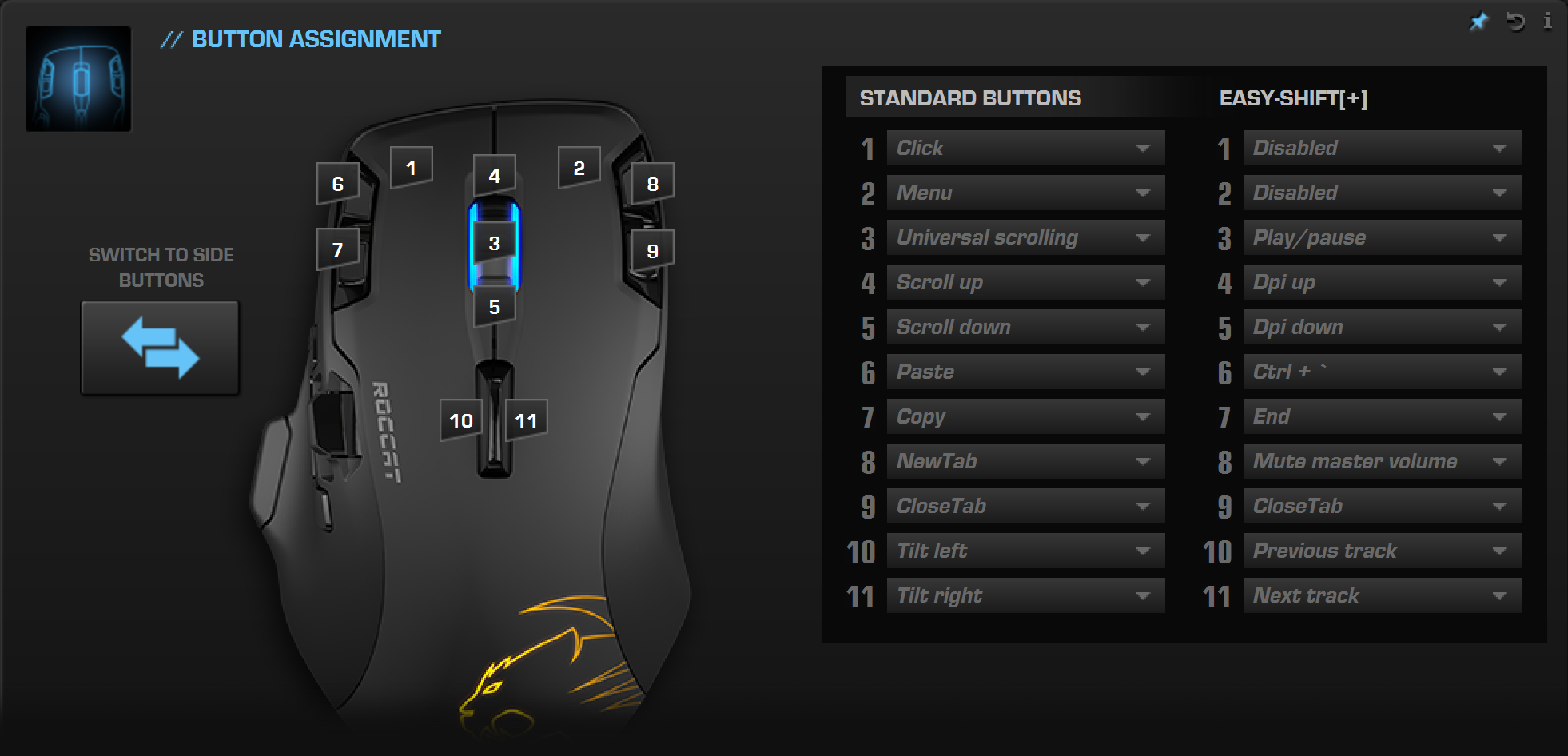
A high‑DPI mouse with a bank of programmable buttons is my secret weapon. Ditto binds copy, paste, and a searchable clipboard history to those buttons, letting me launch into code snippets, PowerShell cmdlets, or templated emails in milliseconds. Ditto’s cloud‑synced database doubles as a mini knowledge‑base—reusable macros and scripts are never more than a click‑scroll away.
8 · Working with Tomorrow — AI Toolchain
Tool
Primary Use
Why It’s on the List
LM Studio
Run & benchmark open‑source LLMs locally
Lets me craft, refine, and stress‑test system prompts before rolling anything into production.
OpenAI Desktop App
Cloud LLM with memory
GPT‑4o’s new long‑term memory has turned ChatGPT into a genuine digital chief‑of‑staff—I can reference months‑old context without re‑uploading briefs.
These two tools form my “local + cloud” pincer: iterate offline, scale online.
9 · Honourable Mentions
Windows Snipping Tool — Win +Shift +S for instant region capture, markup, and copy‑to‑clipboard; replaces ShareX for 99 % of needs.
VS Code — lightweight IDE + Git integration.
Syncthing — peer‑to‑peer folder replication for air‑gapped clients.
Veeam Backup & Replication — image‑based backups, individually managed or controlled by a server for large deployments.
Conclusion — Software is Process
The right stack erases drag so I can focus on value‑add work: advising, architecting, and automating. This toolkit is opinionated, battle‑tested, and—most important—repeatable across client sites.
Stay tuned for Part 3, where we wire these tools together with workflow automations and scripting magic.
Sources & Downloads
Tool
Official Link
Mozilla Firefox
https://www.mozilla.org/firefox/
Multi-Account Containers (Firefox Add-on)
https://addons.mozilla.org/firefox/addon/multi-account-containers/
uBlock Origin (Firefox Add-on)
https://addons.mozilla.org/firefox/addon/ublock-origin/
Start11 v2
https://www.stardock.com/products/start11/
Fences 6
https://www.stardock.com/products/fences/
Multiplicity
https://www.stardock.com/products/multiplicity/
Microsoft 365
https://www.microsoft.com/microsoft-365
KeePassXC
YubiKey (hardware 2FA)
https://www.yubico.com/products/yubikey/
Vaultwarden (self-hosted Bitwarden fork)
https://github.com/dani-garcia/vaultwarden
PortableApps.com Platform
Rainmeter
Win10 Widgets skin
Ditto Clipboard Manager
https://ditto-cp.sourceforge.io/
LM Studio
OpenAI Desktop App
https://openai.com/chatgpt/download
Windows Snipping Tool
https://support.microsoft.com/windows/use-snipping-tool-to-capture-screenshots
Visual Studio Code
https://code.visualstudio.com/
Syncthing
Veeam Backup & Replication
https://www.veeam.com/virtual-machine-backup-solution-free.html
If you are lucky enough to still have the discontinued Roccat Leadr mouse try this config!